Printable Word Search (Free PDF): Download, Print & Solve
A printable word search is a PDF puzzle you download, print and solve with a pen or pencil, and you can finish one in a few minutes with no screen, login or batteries. To get a clean copy, set the paper to Letter or A4, choose "Fit to page" and print in black and white; this guide also covers the fastest ways to find every word.
▶ Play Word Search free →A printable word search turns a few spare minutes into a satisfying puzzle: download a PDF, print the page, and start hunting for hidden words. You need no batteries and no login, just a grid of letters, a word list and a quiet moment. That simplicity is why these puzzles show up in classrooms, waiting rooms, on road trips and during rainy afternoons.
Below you’ll find what a word search is, how to print one cleanly, and how to spot every word quickly.
What a word search is
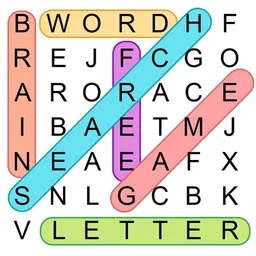
A word search is a grid of letters with a list of words hidden inside it. Every hidden word sits in a straight, unbroken line and can run in up to eight directions:
- left to right
- right to left
- top to bottom
- bottom to top
- the four diagonals
The leftover letters are filler, placed there to disguise the answers.
What makes a puzzle printable
A printable word search is the same puzzle laid out as a PDF built for paper. Look for a large, high-contrast grid, a clear word list underneath or beside it, and usually a matching answer key on a second page. A well-made word search PDF fits on one sheet, and its letters stay crisp in black and white, which keeps ink use low.
Styles you’ll come across
- Themed grids: animals, holidays, sports or science vocabulary. These work well for classrooms and parties.
- Difficulty levels: small kids’ grids (10×10, no diagonals or reversals) up to large expert grids (20×20+, with words running backwards and diagonally).
- Large-print editions: bigger letters and fewer words, a good fit for younger children and older solvers.
How to print and play
- Open the PDF you downloaded and check the preview. You should see the grid and its word list.
- Set the paper size to Letter or A4 to match your printer.
- Choose “Fit to page” (or “Shrink oversized pages”) so nothing gets clipped at the margins.
- Print in black and white to save color ink; word searches read perfectly in grayscale.
- Print the puzzle page, and optionally the answer key on a separate sheet.
- Read the word list first so your eyes know what they are hunting for.
- Find and circle each word, then cross it off the list.
- Finish the grid, then check against the answer key if you printed one.
For your first pass, use a pencil instead of a pen. It lets you erase a mis-circled word, and a highlighter makes found words easy to see at a glance.
Tips for solving faster
A little method beats random staring. Try these:
- Chase rare letters. Words containing Q, Z, X, J or K stand out among common letters. Spot the rare letter, then build the word around it.
- Do a first-letter sweep. Pick one word from the list and scan row by row for just its starting letter. Check the eight directions only when you find a match.
- Give diagonals a dedicated pass. People miss diagonal words more than any other kind. Once the obvious horizontals and verticals are gone, deliberately trace the diagonals.
- Remember words can be backwards. If a word refuses to appear, re-read the lines in reverse. Ocean may be hiding as n-a-e-c-o.
- Cross off as you go. Removing found words shrinks what your eyes have to track and speeds up the final stretch.
If you like shorter, snappier grids, our guide to 5-letter word searches covers a popular fixed-length variant and the “five-cell window” trick that goes with it.
Make your own printable word search puzzles
You don’t have to rely on pre-made sheets. A free online generator lets you type in a theme and a word list, pick a grid size, and get a printable PDF with a matching answer key. That suits a teacher building a spelling list, a birthday party with guests’ names hidden in the grid, or a vocabulary drill built around exactly the words you want to practice.
Keep your list to about 10–20 words for a one-page grid, and avoid words that overlap awkwardly if you want a clean layout.
Where to find a free printable word search
A free printable word search is easy to come by, and the grids here are free to download and print for personal, classroom or family use. Pick a theme and a difficulty level that match your solver, then print the answer key only if you want it handy.
A printable word search is the easiest screen-free puzzle there is: download, print, and start circling. Keep a themed stack on hand for quiet moments. When you’d rather skip the printer, you can also play a fresh grid online and find every word with a tap-and-drag.
FAQ
Are printable word searches free?
Yes. The grids here are free to download and print as PDFs for personal, classroom or family use. You can print as many copies as you need without creating an account.
What paper size should I use?
Standard Letter (8.5×11 in) or A4 both work. Choose 'Fit to page' in your print dialog so the whole grid and word list land on one sheet without being cut off.
Do printable word searches come with answers?
Most printable sets include a separate answer key page that shows every word circled. Print it too if you want to check solutions, or leave it out for a no-spoiler challenge.