
Hearts Card Classic: A Hearts Card Classic App Review
by Games By Post · Hearts · Android
If you want a clean, fast hearts card classic app that costs nothing and lets you practice against three computer skill levels, Hearts Card Classic is worth a look. It holds a 4.2 rating from 18,636 Android ratings, but frequent ads are the main complaint.
Android
- Rating
- ★ 4.2 (18.6K ratings)
- Price
- Free
- Installs
- 500K+
- Ads
- Contains ads
- In-app purchases
- No
- Last updated
- 2026-04-11
- Version
- 2.4
Rating history (2026-11-03 → 2026-11-14): 4.20 → 4.20 → 4.20 → 4.20 → 4.20 → 4.20 → 4.20 → 4.20 → 4.20 → 4.20 → 4.20 → 4.20
Pros
- Free to download with no price on Android
- Three computer difficulty levels: Easy, Standard and Pro
- Optional hint button shows how the Pro player would play
- Tracks wins, losses and moon shots over time
- Clean interface and fast rounds that players praise
Cons
- Ads appear between rounds, and reviewers say they are frequent
- No paid option to remove ads
- Some reviewers report crashes and ads that cannot be closed
- Reported bugs include scores not clearing and an invisible queen of spades
What players say
Players like
- Clean interface and fast-paced hands
- Several reviewers call it one of the best hearts games on mobile
- Ads are described as tolerable or milder than in other apps by some players
Common complaints
- Ads between rounds are the most common complaint, and some say they cannot be closed
- A few players report crashes after the April 2026 update
- Several want an ad-free purchase, which does not exist
- Bugs such as an invisible queen of spades and scores not resetting
Who Hearts Card Classic suits
Hearts Card Classic, from developer Games By Post, suits players who want fast, no-cost hearts practice on an Android phone. It is a straightforward hearts card classic app: you sit against three computer opponents, play quick hands and watch your stats build up. If you can live with ads between rounds, it delivers. If ads ruin a card game for you, read the monetization section before installing.
The app has 500,000 installs and a 4.2 rating across 18,636 ratings on Google Play. Reviews lean positive, with several players calling it one of the best hearts options on mobile, though a cluster of one-star reviews pulls the score down.
How the gameplay works
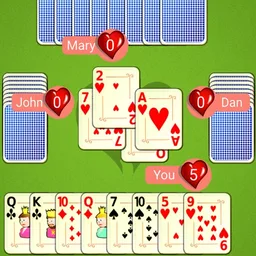
The core of Hearts Card Classic game play is solo hearts against the computer. You pick from three difficulty settings: Easy, Standard and Pro. Cards are dealt randomly to every player, so the levels differ only in how the computer chooses what to play. That makes the Pro setting a fair test rather than a rigged one, although one reviewer did complain about feeling outnumbered, one against four.
Hints and statistics
A hint button can be turned on, and it shows how the Pro computer player would handle your current hand. That makes it useful for learning, and you can switch it off once you want to play on your own. The app also keeps statistics for wins, losses and moon shots, so you can see whether you are improving.
Pace and interface
Players describe the interface as clean and the rounds as fast paced. One reviewer even complains that plays are so fast that an ad after each one feels excessive, which tells you how short hands can be.
Known bugs
A reviewer who rated the game four stars says the April 2026 update (version 2.4, last updated April 11, 2026) added problems without fixing older ones. They mention that not all scores clear after the first round of a new match, and that the queen of spades sometimes shows up as an invisible card. Others report crashes. Keep that in mind, because those problems could affect a game built around counting points.
Monetization: ads are the trade-off
Hearts Card Classic costs nothing to download and has no in-app purchases, but it contains ads. This is where opinions split. Some players call the ads tolerable or less bad than in most free apps. Others say an ad appears after every play, that some ads cannot be closed, or that ads promoting other apps pop up constantly. One reviewer reports non-stop ads that crash the app.
There is also no way to pay and remove them. Two separate five-star reviewers say they would buy an ad-free version if it were offered. If you are shopping among the many similar apps, such as Hearts - Card Game Classic, Hearts: Card Game, Hearts+ or Hearts: Classic Card Game, ad frequency should be the deciding factor.
Platform differences
The data behind this review covers the Android version only. Google Play lists it as released on May 15, 2018, and the listing shows no price and no in-app purchases. We have no store data for an iPhone version, so if you are on iPhone, check the App Store for current ratings and ad behavior before downloading. Android players, meanwhile, should look at the most recent reviews, since several mention stability issues following the latest update.
Bottom line
Pick Hearts Card Classic online or offline for free hearts practice, with three difficulty levels, an optional hint button and useful stats. Skip it if frequent ads or the reported bugs would frustrate you.
Best for: Solo players who want quick, free hearts practice on Android and can put up with frequent ads.
FAQ
Is Hearts Card Classic free?
Yes. The Android version costs nothing and has no in-app purchases, but it contains ads.
Can I remove the ads in Hearts Card Classic?
No. The brief lists no in-app purchases, and reviewers specifically say they would pay for an ad-free version if one existed.
How good are the computer players in this hearts card classic game?
There are three levels: Easy, Standard and Pro. Cards are dealt randomly to everyone, so the difference is only in how each computer player chooses its plays.
Is Hearts Card Classic on iPhone too?
The data available for this review covers only the Android version, so check the App Store directly for an iPhone listing.
Games like Hearts Card Classic



1990s.games is not affiliated with Games By Post. App names, icons and trademarks belong to their owners; data from the App Store and Google Play, updated weekly. Developer of this app? Email [email protected] to correct or update this page.