Colors by Number App: Pixel Art Coloring Game Review
by EYEWIND LIMITED · Number Puzzles · iOS
The Colors by Number app (Colors by Number® – No.Draw®, from EYEWIND LIMITED) is a free pixel-art coloring game where you fill numbered blocks to reveal a picture. It holds a 4.7 rating from 74,211 iPhone ratings, and players praise how relaxing it is while complaining about ads.
iPhone & iPad
- Rating
- ★ 4.7 (74.2K ratings)
- Price
- Free
- Size
- 195.3 MB
- Requires
- iOS 15+
- Languages
- 21
- Last updated
- 2026-10-20
- Version
- 1.12.2
Rating history (2026-11-03 → 2026-11-14): 4.68 → 4.68 → 4.68 → 4.68 → 4.68 → 4.68 → 4.68 → 4.68 → 4.68 → 4.68 → 4.68 → 4.68
Pros
- Free to download, with a 4.7 iPhone rating from 74,211 ratings
- Simple tap-the-number gameplay that suits kids and adults
- Players call it relaxing and say the finished picture looks beautiful
- Actively maintained: iOS version 1.12.2 was updated on October 20, 2026
- Supports 21 languages on iOS
Cons
- Players say the ads are frequent and intrusive
- Some reviewers dislike paying for a subscription to access drawing features
- A few reviewers report membership status glitches and lost drawings after an update
- Zooming in is required to color, which some players find annoying
What players say
Players like
- The relaxing, satisfying feel of finishing a picture
- Easy gameplay that keeps kids occupied for a while
- The beautiful look of the completed artwork
Common complaints
- Too many ads
- Having to pay for some drawing content
- Membership glitches and progress loss after an update
- Having to zoom in close to color
How the Colors by Number app plays
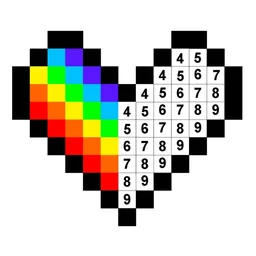
The core idea is simple. Each picture is built from pixel blocks, and every block carries a number. You pick the matching color and tap the blocks until the image fills in. That is the whole loop, and it is why this colors by number game works for a kid on a parent’s phone as well as for an adult winding down in the evening.
The app, published by EYEWIND LIMITED, has been on the App Store since December 2017. The current iOS build is version 1.12.2, updated on October 20, 2026, and it weighs in at 195.3 MB and needs iOS 15 or later. It is available in 21 languages, so the number-matching idea carries across regions without much text to read.
One thing to know before you start: some players say they must zoom in close to color, and they find that annoying. If you prefer to see the whole picture while you work, that is worth keeping in mind.
You can also play a free browser version of this style of game on 1990s.games if you want to test the idea first.
What players say
The iPhone rating is 4.7 across 74,211 ratings, which is strong for a game with this much traffic. Reviews follow a clear pattern.
What people enjoy
Many reviewers describe it as relaxing and “annoyingly satisfying.” Several mention the payoff at the end, when the finished picture looks beautiful. One parent says it kept their kid quiet for at least 20 minutes, which fits the app’s easy, low-pressure design.
What people complain about
Ads are the loudest complaint. Several four-star reviewers say they would rate higher if there were fewer. Others dislike that drawing features sit behind payment. A few reports are more serious: one player says membership status seemed to drop while coloring, and another says their earlier drawings were gone after an update. These are individual reports rather than a verdict on every user, but they are worth knowing if you plan to pay.
Ads and in-app purchases
The app is free to download. Free players get the free coloring content, a limited number of tools such as Tips and Shields, and can unlock some features by watching rewarded videos. The free version may show interstitial, banner and native ads.
A VIP subscription unlocks all coloring content, gives unlimited in-game tools and removes ads. If ads are what bother you most in the reviews, that subscription is the direct fix. Check the price shown in the store before you commit, since it is not listed in the data used for this page.
iPhone vs Android
The numbers on this page come from the iPhone listing: a 4.7 rating, free price, and a recent October 2026 update. We do not have Android figures here, so check the Google Play page for its rating, size and update date before installing. Expect the same core number-matching play on both, but the ad load and subscription experience can differ by platform. One reviewer also noted the app feels different on an iPad and a laptop, so a phone is the safest place to start.
Who should try it
Pick this colors by number app if you want a relaxing, easy pixel-art pastime and you are fine with ads or willing to subscribe. If you hate ads and do not want to pay, look at the similar apps Happy Color®: Color by Number and Pixel Art - Color by Number, or try a different number puzzle such as 2248 - Number Puzzle Game or Numpuz: Number Puzzle Games.
Best for: Players who want a calm, low-effort coloring pastime and can tolerate ads or pay for the VIP subscription.
FAQ
Is the Colors by Number app free?
Yes. The iPhone version is free to download, with a price of $0. Free players get the free coloring content and a limited number of tools, and the free version can show interstitial, banner and native ads. A VIP subscription unlocks more content and removes ads.
How does the Colors by Number game work?
You color a pixel-art picture by tapping blocks that match the same number. As you fill in more blocks, the full image appears. There is no drawing skill needed, which is why it works for both kids and adults.
Does it work on both iPhone and Android?
This page's data covers the iPhone version, which needs iOS 15 or later and is about 195.3 MB. Check the Google Play listing for Android details such as size and rating, since they can differ from the iOS numbers.
Can I play a similar game in my browser?
Yes, a game of this kind can also be played free in the browser on 1990s.games, so you can try the idea before installing anything.
Games like Colors by Number® – No.Draw®
1990s.games is not affiliated with EYEWIND LIMITED. App names, icons and trademarks belong to their owners; data from the App Store and Google Play, updated weekly. Developer of this app? Email [email protected] to correct or update this page.