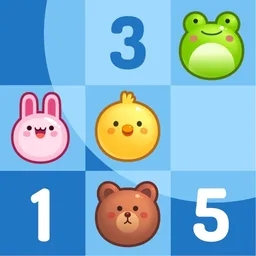
Kidoku is a kids Sudoku puzzle app that starts with tiny boards and animal blocks before moving to number grids. It holds a 4.5 rating on the App Store, but reviewers keep running into a paywall around level 9 or 10.
iPhone & iPad
- Rating
- ★ 4.5 (813 ratings)
- Price
- Free
- Size
- 135.6 MB
- Requires
- iOS 14.0+
- Languages
- 1
- Last updated
- 2025-05-19
- Version
- 2.2
Rating history (2026-11-03 → 2026-11-14): 4.53 → 4.53 → 4.53 → 4.53 → 4.53 → 4.53 → 4.53 → 4.53 → 4.53 → 4.53 → 4.53 → 4.53
Pros
- Starts with small 2×2 and 4×4 boards, so young kids can learn the rules gently
- Animal Mode swaps numbers for colorful characters, with Classic Mode for older kids
- Free to download, with a 4.5 App Store rating from 806 ratings
- Works offline and the store listing describes it as ad-free
- Hints, undo and eraser tools are available
Cons
- Reviewers say progress stops around level 7 to 10 until you pay
- Several players report the $5.99 unlock failing to register after purchase
- Only one language is listed
- The 135.6 MB download is fairly large for a puzzle app
What players say
Players like
- Beginner-friendly difficulty that makes Sudoku approachable for small kids
- Cute, simple play that children want to keep going back to
- Some families say the last levels feel harder than regular number Sudoku, which gives older kids something to chew on
Common complaints
- The paywall that appears after roughly level 7 to 10
- Purchase problems, including charges where the app did not unlock and one case where no purchase option appeared
- A few players feel the app taught them little
How Kidoku plays
Kidoku is built around a simple idea: teach the logic of Sudoku with small boards first. According to the listing, kids begin with 2×2 and 4×4 puzzles and later move up to 6×6 and 9×9 grids. That ramp matters, because a standard 9×9 grid can overwhelm a five-year-old.
There are two modes. Animal Mode replaces digits with characters, so a child matches pictures instead of numbers. Classic Mode uses numbers, which suits kids who are ready for the real thing. Blocks are dragged into place, and hints, undo and an eraser are available when a child gets stuck.
The app is rated 4.5 on the App Store from 806 ratings. It was released in April 2021, and the latest version, 2.2, was updated on May 19, 2025. It needs iOS 14.0 or later and takes up 135.6 MB.
Who it suits
Kidoku fits preschoolers and early elementary kids best. Older children who already enjoy number puzzles may outgrow it quickly, though one family reported that the final levels were harder than regular number Sudoku.
What players say
The good reviews are short and cheerful. Players call it fun, praise it as a beginner-level way to play Sudoku, and say their kids want to keep playing. One parent says both a younger and an older child enjoyed it.
The complaints are more specific. Many reviewers hit a wall around level 7 to 10 and say the rest of the game has to be bought. A few say the difficulty climbs with every level, and some puzzles feel confusing. One player felt they didn’t learn anything from it.
Ads and in-app purchases
The store listing calls Kidoku 100% ad-free, with no pop-ups, and the app is free to download. The money question is the unlock. Reviewers mention a $5.99 payment to continue past the early levels.
That is where the trouble shows up. One player says the app showed an error after paying, another says Apple charged them but the levels stayed locked, and a parent says they found no way to buy at all. If you decide to pay, test the unlock right away and keep your receipt in case you need a refund.
iPhone vs Android
The data in our brief covers the iPhone version only, so we can’t compare it with an Android release or say how it differs. Everything above, including the rating, version and size, refers to iOS.
If you want a Sudoku for kids that avoids the paywall question, similar apps such as Meowdoku! and Sudoku.com - Number Games are worth a look. We don’t have their numbers here, so check each store page for current pricing.
Best for: Parents of young children who want a gentle first step into Sudoku, and who are fine paying a one-time fee to unlock the full set of levels.
FAQ
Is Kidoku free?
Kidoku is free to download on the App Store, but reviewers say you need to pay $5.99 to go past roughly level 7 to 10. Some players report trouble with that unlock, so check that it works before handing the device to your child.
What ages is Kidoku for?
The developer targets ages 3 to 12. Animal Mode suits the youngest players, while Classic Mode with numbers is meant for older kids.
Can I play Kidoku online?
The store listing says Kidoku works offline with no internet required, so a Kidoku online connection isn't needed. If you want a Sudoku your kids can try on a computer, the game can also be played free in the browser on 1990s.games.
Does Kidoku have ads?
The store listing describes it as ad-free, and the reviews in our brief don't mention ads. The main complaint is the paywall, not advertising.
Games like Kidoku – Kids Sudoku Puzzle


1990s.games is not affiliated with Chao-Hsin Shih. App names, icons and trademarks belong to their owners; data from the App Store and Google Play, updated weekly. Developer of this app? Email [email protected] to correct or update this page.