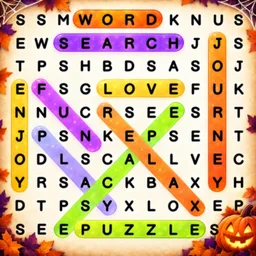
Word Search Journey App: Gameplay, Ads and Player Feedback
by Bluetile Games S.L. · Word Search · iOS
The word search journey app (Word Search Journey - Puzzle, by Bluetile Games S.L.) is a free travel-themed word search with a 4.8 rating from 63,980 iPhone ratings. Players swipe across a letter grid to find words, and reviewers praise how calming and easy to read it is. The most common complaint is the volume of ads.
iPhone & iPad
- Rating
- ★ 4.8 (64.7K ratings)
- Price
- Free
- Size
- 343.8 MB
- Requires
- iOS 15.0+
- Languages
- 10
- Last updated
- 2026-10-28
- Version
- 4.9.0
Rating history (2026-11-03 → 2026-11-14): 4.77 → 4.77 → 4.77 → 4.77 → 4.77 → 4.77 → 4.77 → 4.77 → 4.77 → 4.77 → 4.77 → 4.77
Pros
- Free to download, with a 4.8 rating from 63,980 iPhone ratings
- Four difficulty levels: Easy, Medium, Hard and Pro
- Letters are large and clear, so words are easy to spot
- Works offline, per the developer's listing
- Players describe it as calming and good for keeping the brain active
Cons
- Reviewers repeatedly complain about too many ads and pop-ups
- The iOS download is large, at 343.8 MB
- Some reviewers say reward promises, such as cash payouts, did not match what they got
What players say
Players like
- Big, clear letters and simple finger-drag controls
- A calming way to exercise the brain
- Easy to pick up, with a layout many seniors find comfortable
Common complaints
- Too many ads and pop-ups, which reviewers say get longer and more frequent
- Reward claims, such as cash payouts, that some say were misleading
How the word search journey app plays
The word search journey app follows the classic formula. You get a grid of letters and a list of words to find. Swipe up, down, left, right or diagonally to mark each one. There is no tricky control scheme to learn. One reviewer summed it up as pointing and dragging a finger across the letters, and that is about all there is to it.
What sets it apart is the travel theme. Levels are built around destinations from around the world, alongside classic word categories. Difficulty runs across four tiers: Easy, Medium, Hard and Pro. The early puzzles are gentle, and the developer says the challenge ramps up quickly. If you want something to read like a paper puzzle book with scenic backdrops, that is the idea here.
The app is also built to work without Wi-Fi, so it suits commutes, flights and waiting rooms. It supports 10 languages. Version 4.9.0 was updated on October 28, 2026, so it is actively maintained. The game launched in August 2021.
If you like the format but prefer to skip downloads, the same kind of puzzle can also be played free in the browser on 1990s.games.
What players say
The feedback is strongly positive on the core experience. The app holds a 4.8 rating from 63,980 iPhone ratings, and most of the sampled reviews are five stars.
What people enjoy
- Readability. Reviewers like that the letters are large and clear, which makes words easy to spot.
- Calm, brain-friendly play. Several describe it as relaxing while still keeping the mind working. One player recovering from health problems said they wanted games that engage the brain rather than simple block-moving or shooting.
- Senior-friendly design. One reviewer says everything is comfortable for older players. Another mentions it reminded them of a parent who loved paper word search books.
What frustrates people
Ads are the recurring complaint. Even some five-star reviews say there are too many, and low-rated ones focus on pop-ups. One reviewer says ads get longer and more frequent as you near a reward. Another says the promise of instant cash rewards did not hold up. Treat any reward promise with caution and read the in-app terms before you invest time.
Ads and in-app purchases
The download is free at $0. The brief does not list in-app purchase details, so we can’t say what, if anything, you can buy to remove ads. What we can say is that player reviews point to frequent ad breaks and pop-ups. If ads break your concentration, expect some irritation. If you play in short bursts and don’t mind watching a few, the free price is hard to argue with.
iPhone vs Android
The data we have covers the iPhone version. It requires iOS 15.0 or later and takes up 343.8 MB, which is sizable for a word search. Ratings, reviews and update history above all come from the App Store.
The brief has no Android data for this app, so we can’t compare the two versions or confirm how ads behave on Android. If you use an Android phone, check the Google Play listing for the current rating, size and reviews before installing.
Who should play it
This is a good pick if you want an easy, scenic word search that you can play offline in short sessions. It suits seniors and casual players especially well. If you are sensitive to ads, or you want a paid, ad-free experience, look at similar titles such as Word Search Explorer, Word Search Quest Puzzles or Word Search Sea: Offline Games, and compare their stores before downloading.
Best for: Casual players, including seniors, who want a relaxing, easy-to-read word search for short sessions and can put up with frequent ads.
FAQ
Is the word search journey app free?
Yes. The iPhone version is listed at $0. Reviewers say it is supported by a lot of ads.
How hard does Word Search Journey get?
It has four levels: Easy, Medium, Hard and Pro. The developer says it starts easy and gets harder quickly.
Can I play Word Search Journey offline?
The developer's listing says no Wi-Fi is required, so you can play without a connection.
Is there an Android version?
The brief only includes iPhone store data, so we can't confirm Android details here. Check Google Play for availability and current ratings.
Games like Word Search Journey - Puzzle



1990s.games is not affiliated with Bluetile Games S.L.. App names, icons and trademarks belong to their owners; data from the App Store and Google Play, updated weekly. Developer of this app? Email [email protected] to correct or update this page.