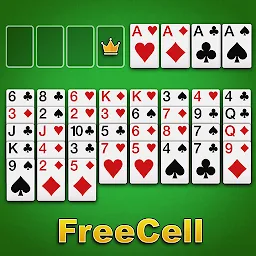
FreeCell Solitaire App by nerByte: Honest Review
by nerByte GmbH · FreeCell · Android
This freecell solitaire app from nerByte GmbH suits players who want a relaxed, offline-friendly FreeCell with large cards and unlimited undo. It holds a 4.5 rating from 34,133 ratings on Android and has passed 1,000,000 installs, though ads are the main complaint.
Android
- Rating
- ★ 4.5 (34.1K ratings)
- Price
- Free
- Installs
- 1M+
- Ads
- Contains ads
- In-app purchases
- Yes
- Last updated
- 2026-09-23
- Version
- 3.9.9.9.9.9.7
Rating history (2026-11-03 → 2026-11-14): 4.52 → 4.52 → 4.52 → 4.52 → 4.52 → 4.52 → 4.52 → 4.52 → 4.52 → 4.52 → 4.52 → 4.52
Pros
- Rated 4.5 on Android across 34,133 ratings
- Free to download with more than 1,000,000 installs
- Works offline, so ads can be avoided in airplane mode
- Large cards and a useful set of settings
- Reversible trial moves make tricky deals easier to explore
Cons
- Contains ads, and some players say they interrupt play too often
- Includes in-app purchases
- Hints are limited, and some players dislike the pulsing card hint
- Some players find the difficulty on the easy side
What players say
Players like
- Relaxing, simple play that still feels challenging on tougher deals
- Large cards and good settings options
- Ability to reverse trial moves to test different paths
- Ads that many reviewers call light, with a short one at the end of a game
Common complaints
- Ads that some reviewers say take over, with a few saying they spend more time on ads than on cards
- The pulsing card hint, which one player found distracting
- Help that is useful but limited
Who this FreeCell app suits
FreeCell Solitaire by nerByte GmbH is a good fit for people who want a quiet, classic card game on their phone without a lot of fuss. Reviewers call it relaxing, simple and friendly, and several say they have played FreeCell for years and found this version easy to pick up. If you prefer large cards and a calm pace over flashy extras, this freecell solitaire app is worth a look. If ads break your concentration, read the monetization section before installing.
The numbers back up the general mood. On Android it holds a 4.5 rating from 34,133 ratings, and it has been installed more than 1,000,000 times. The listing was first released on Nov 24, 2020, and the most recent update was on Sep 23, 2026 (version 3.9.9.9.9.9.7), so it is still maintained.
Gameplay
The game plays as traditional FreeCell. Reviewers describe it as somewhat challenging, fun and good for keeping the mind alert, while a newcomer thought it might lean toward the easy side. That mix suggests it works for casual sessions more than for hardcore puzzle solving.
Undo, hints and settings
One of the most useful features, according to players, is the ability to make trial moves and reverse them. That lets you test different paths on a tough deal and learn from them. Help is available, but one reviewer calls it useful yet limited. Another dislikes it when a card pulses to give a hint, so expect a bit of visual nudging.
Players also single out the large cards and the range of settings. Easy-to-read cards matter in a game where you track many columns at once, particularly on a small phone screen.
Ads and in-app purchases
The app is free to download, but it contains ads and in-app purchases. The brief gives no purchase prices, so check the store listing for details. Opinions on the ads are split, and it is the biggest divider in the reviews.
Some players are happy. One says an advert at the end of a game is fine and that the ads are neither pushy nor long. Another says there are hardly any ads. Others disagree strongly: one calls the ads unending, one says they are tricky, and one says they spend more time on ads than playing. The one practical tip from reviewers is that the game works in airplane mode, so ads can be skipped entirely if you play offline.
iPhone vs Android
All the figures and reviews we have for this app come from Android, and that is the version we are describing here. We have no iPhone data for it, so we can’t compare the two versions. If you are on iPhone, check the App Store for an equivalent listing, ratings and pricing before you decide.
Before you download
If you are unsure about FreeCell itself, you can play the game free in the browser on 1990s.games first, with no install. If you like it and want a mobile version with large cards, flexible settings and reversible moves, this app is a solid pick, provided you are comfortable with an ad after each game. The listing names other FreeCell titles as similar, so it is worth comparing a few if the ads bother you.
Best for: Casual players who want a calm, classic FreeCell with undo and large cards, and who can put up with an ad after games.
FAQ
Is this FreeCell Solitaire app free?
Yes. The Android version costs nothing to download. It contains ads and offers in-app purchases.
Can I play it offline?
Yes. One reviewer says it works fine in airplane mode, which also means the ads can be skipped entirely.
Is it good for beginners?
Reviews describe it as easy and relaxing, and some players find it somewhat challenging. Reversible trial moves and a limited help feature give new players room to learn.
Can I play FreeCell without installing an app?
Yes. FreeCell can also be played free in the browser on 1990s.games, which is handy if you want to try the rules before downloading anything.
Games like FreeCell Solitaire



1990s.games is not affiliated with nerByte GmbH. App names, icons and trademarks belong to their owners; data from the App Store and Google Play, updated weekly. Developer of this app? Email [email protected] to correct or update this page.