
AGED Freecell Solitaire App Review: Ratings, Features and Ads
by Aged Studio Limited · FreeCell · iOS, Android
The AGED Freecell solitaire app from Aged Studio Limited is a free FreeCell game with a 4.7 rating on Android and 4.5 on iPhone. It has been on both stores since 2020 and was updated in August 2026, so it is still maintained. The trade-off is ads, which are the main complaint in player reviews.
iPhone & iPad
- Rating
- ★ 4.5 (850 ratings)
- Price
- Free
- Size
- 178.5 MB
- Requires
- iOS 15.0+
- Languages
- 24
- Last updated
- 2026-08-21
- Version
- 1.5.14
Android
- Rating
- ★ 4.7 (4.4K ratings)
- Price
- Free
- Installs
- 500K+
- Ads
- Contains ads
- In-app purchases
- Yes
- Last updated
- 2026-08-24
- Version
- 1.5.16
Rating history (2026-11-03 → 2026-11-14): 4.52 → 4.52 → 4.52 → 4.52 → 4.52 → 4.52 → 4.52 → 4.52 → 4.52 → 4.52 → 4.52 → 4.52
Pros
- High ratings on both stores: 4.7 from 4,369 ratings on Android and 4.5 from 850 on iPhone
- Free to download, with 500,000+ installs on Android
- Actively maintained, with updates in August 2026 on both platforms
- Unlimited hints and undo, plus auto-complete and single-tap moves
- Works offline, per Android player reviews
Cons
- Contains ads, and some players find them frequent
- An in-app purchase or subscription to remove ads draws complaints
- Cards are on the small side for some players, who ask for larger faces
- Some players find it easier than the original FreeCell
What players say
Players like
- The classic, simple style and customizable setup (backgrounds, card styles, hand choice)
- It makes you think through each deal, and many find it relaxing and mind-sharpening
- Hints, undo and the fireworks on a win
- Works well offline and suits seniors and quick sessions
Common complaints
- Ads, including one before each new game and a banner on iPhone
- Cards and numbers that are too small, with no larger deck option
- Being sent to another game after a round on iPhone, and prompts to update on Android
What the numbers tell us
The AGED Freecell solitaire app has a 4.7 rating on Android from 4,369 ratings and 500,000+ installs. On iPhone it holds 4.5 from 850 ratings. Those are strong scores for a free card game, and the Android sample is large enough that the number is trustworthy. The iPhone score is a bit lower, and reviews suggest ads play a part.
It is also a long-running title. It launched in 2020 and was last updated in August 2026: version 1.5.16 on Android (August 24) and 1.5.14 on iPhone (August 21). That steady cadence over six years suggests the developer, Aged Studio Limited, still supports it. On iPhone the app is 178.5 MB and needs iOS 15.0 or later, and it offers 24 languages.
How it plays
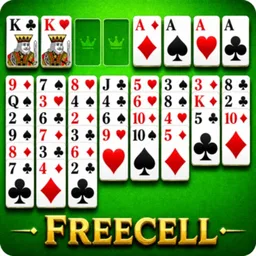
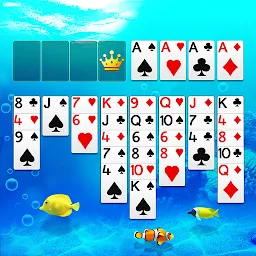
This is classic FreeCell: all cards are dealt face up, you use four free cells and build four foundations from Ace to King. Skill matters more than luck, so every move is a planning decision.
Features on each platform
Both stores list auto-complete, landscape and portrait play, and a clean, simple interface. Beyond that, the listings differ a little:
- iPhone: a Daily Challenge, numbered games (enter a number from 1 to 64,000), winning deals that are guaranteed solvable, unlimited hints, and a choice of right- or left-handed layout.
- Android: unlimited undo, detailed statistics, auto-save when interrupted, single-tap card moves, and several backgrounds and card styles.
Players on Android also mention that it works offline, and one praises the fireworks on a win. Customization comes up often. One reviewer likes being able to set the game up the way they play.
Difficulty
Reviews split a little here. Some iPhone players say it is hard enough to make you use your brain, while one Android player finds it less challenging than the original. Since the iPhone version offers winning deals and random deals, you can pick how much of a puzzle you want.
The ads question
The Android version contains ads and in-app purchases. Ads are the most common complaint. One iPhone reviewer reports an ad each time they start a new game, plus a banner at the top, and another dislikes being sent to a different game after each round. On Android, one player left a 1-star review over a subscription to remove ads. If you hate interruptions, this is the biggest reason to look elsewhere.
Card size is the second recurring note. Both an iPhone and an Android player wish for larger cards or a deck with bigger numbers, which matters on smaller screens.
Who it suits
This app fits players who want a familiar, no-frills FreeCell with hints, undo and plenty of visual options, and who do not mind ads. Several reviewers describe it as relaxing and good for seniors or short sessions. If you want to try FreeCell before installing anything, you can also play it free in the browser on 1990s.games.
Verdict
The AGED Freecell solitaire app earns its high ratings with a classic ruleset, useful helpers and regular updates. The ads and small cards keep it from being perfect, but for a free FreeCell on iPhone or Android it is a dependable pick.
Best for: Casual FreeCell fans who want a free, classic, customizable game with hints and undo, and who can tolerate ads.
FAQ
Is the AGED Freecell solitaire app free?
Yes. It costs nothing to download on iPhone or Android. The Android version contains ads and in-app purchases, and player reviews mention ads on both platforms.
Is it available on both iPhone and Android?
Yes. The iPhone version is rated 4.5 from 850 ratings and requires iOS 15.0 or later. The Android version is rated 4.7 from 4,369 ratings with 500,000+ installs.
Does it have hints and undo?
Yes. The iPhone listing mentions unlimited hints, and the Android listing mentions unlimited undo. Both have auto-complete, and the iPhone version adds a Daily Challenge and numbered games.
Can I play FreeCell free in a browser instead?
Yes. FreeCell can also be played free in the browser on 1990s.games, with no download needed.
Games like AGED Freecell Solitaire

1990s.games is not affiliated with Aged Studio Limited. App names, icons and trademarks belong to their owners; data from the App Store and Google Play, updated weekly. Developer of this app? Email [email protected] to correct or update this page.