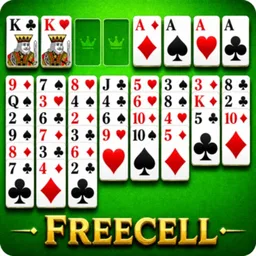
FreeCell: Classic Card Game: A FreeCell App Review
by Appgeneration Software · FreeCell · iOS, Android
FreeCell: Classic Card Game is a free freecell app from Appgeneration Software, rated 4.7 on iPhone and 4.6 on Android. Its standout strength is how many ways it lets you play, from one-cell challenges to difficulty tiers and daily goals. The catch, according to Android reviewers, is an ad load that some players find heavy.
iPhone & iPad
- Rating
- ★ 4.7 (431 ratings)
- Price
- Free
- Size
- 287.8 MB
- Requires
- iOS 15.0+
- Languages
- 8
- Last updated
- 2026-10-24
- Version
- 4.3.12
Android
- Rating
- ★ 4.6 (5K ratings)
- Price
- Free
- Installs
- 1M+
- Ads
- Contains ads
- In-app purchases
- Yes
- Last updated
- 2026-10-14
- Version
- 4.3.12
Rating history (2026-11-03 → 2026-11-14): 4.69 → 4.69 → 4.69 → 4.69 → 4.69 → 4.69 → 4.69 → 4.69 → 4.69 → 4.69 → 4.69 → 4.69
Pros
- Strong ratings on both stores: 4.7 on iPhone from 431 ratings and 4.6 on Android from 4,958
- Free to download on iPhone and Android, with no upfront price
- Android lists five difficulty levels, from Beginner to Master
- iPhone adds two-cell and one-cell variants for a tougher challenge
- Unlimited undo, hints, Auto Complete and a step-by-step tutorial help newer players
Cons
- Android contains ads and in-app purchases, and several reviewers say ads appear after almost every action
- The iPhone build is 287.8 MB, large for a card game
- One Android reviewer reports the left column of cards runs off-screen on a Samsung Galaxy Flip 5
- Daily missions, coins and a Lucky Wheel add reward layers that purists may not want
What players say
Players like
- Four difficulty levels and the challenge are praised as keeping the game interesting and rewarding
- Several reviewers call it relaxing, and one 90-year-old player enjoys the challenge
- Some say it runs without glitches and advances quickly, with a manageable number of ads
- One reviewer likes being able to restart the deal when no moves are left without paying
Common complaints
- Several reviewers complain about ads after finishing, starting or resuming a game
- A few reports of slow performance, a game that won't start, or layout trouble on foldable screens
Where this freecell app stands out
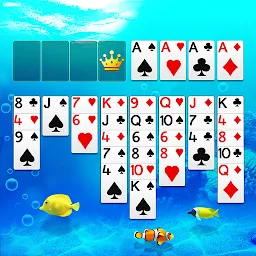
The strongest point of FreeCell: Classic Card Game is flexibility. Developer Appgeneration Software ships it free on both iPhone and Android, and each store version leans on a different strength. On Android, reviewers mention four levels of difficulty, and the listing goes up to Master. On iPhone, you can also drop to two free cells or even one, which turns a relaxed game into a real puzzle.
Help is built in for anyone still learning. There is a step-by-step tutorial, hints, unlimited undo and Auto Complete to finish a solved deal quickly. Daily challenges and missions give you a reason to return, though they also bring coins, trophies and a Lucky Wheel, which some players may see as clutter on a simple card game.
How the ratings compare
The iPhone version holds a 4.7 rating from 431 ratings. The Android version sits at 4.6 across 4,958 ratings and has passed 1,000,000 installs. Both were updated recently (October 2026, version 4.3.12), so the app is clearly maintained. Players tend to describe it as relaxing, challenging and rewarding, and one reviewer in their nineties says it is a fun test for them.
Weaknesses to know about
Ads are the main complaint. The Android build contains ads and in-app purchases, and the lowest reviews describe ads after finishing a game, starting a new one or even returning from a pause. Other reviewers say the ad load is reasonable, so experience may vary, but if interruptions bother you, take note.
Some other points show up in the reviews and listing data:
- One Android player reports slow performance and a game that would not start.
- A Samsung Galaxy Flip 5 owner says the numbers on the left column of cards are cut off by the screen ratio.
- The iPhone download is 287.8 MB, which is heavy for a card game, and it needs iOS 15.0 or later.
Who should pick an alternative
If you want the leanest possible FreeCell with minimal interruptions, you may be happier with another title. The brief’s similar apps include FreeCell: Card Game, FreeCell Solitaire: Card Game+ and FreeCell Solitaire. Foldable phone owners should check recent layout feedback before installing. Players who prefer no download at all can also play FreeCell free in the browser on 1990s.games.
Bottom line
For most people who want a free, well-rated FreeCell with levels, tutorials and daily goals, this one is a solid pick on both iPhone and Android. Just be ready for ads, especially on Android, and decide whether the daily rewards system suits your taste.
Best for: Players who want a free, polished FreeCell with difficulty tiers, daily challenges and plenty of help options, and who can tolerate some ads on Android.
FAQ
Is FreeCell: Classic Card Game free?
Yes. It costs $0 on both iPhone and Android. The Android version contains ads and in-app purchases.
Is this freecell app available on iPhone and Android?
Yes. The iPhone version is rated 4.7 from 431 ratings and requires iOS 15.0 or later. The Android version is rated 4.6 from 4,958 ratings and has over 1,000,000 installs.
Can I play FreeCell for free without an app?
Yes. FreeCell can also be played free in the browser on 1990s.games, with no download needed.
Who should look at an alternative?
Anyone who is bothered by frequent ads or wants a lighter download may prefer another FreeCell title. Players with foldable phones may also want to check layout reviews first.
Games like FreeCell: Classic Card Game


1990s.games is not affiliated with Appgeneration Software. App names, icons and trademarks belong to their owners; data from the App Store and Google Play, updated weekly. Developer of this app? Email [email protected] to correct or update this page.